Headings
Use of appropriate Headings is one of the most important aspects of good readability, useful text content structuring and search engine optimisation. Heading styles should always and only be used for the structuring of longer pieces of text content.
This is what Heading 1 looks like
This is what Heading 2 looks like
This is what Heading 3 looks like
Anything below heading 3 should be bold text
Heading styles are accessed from the Format > Formats > Headings editor menu.
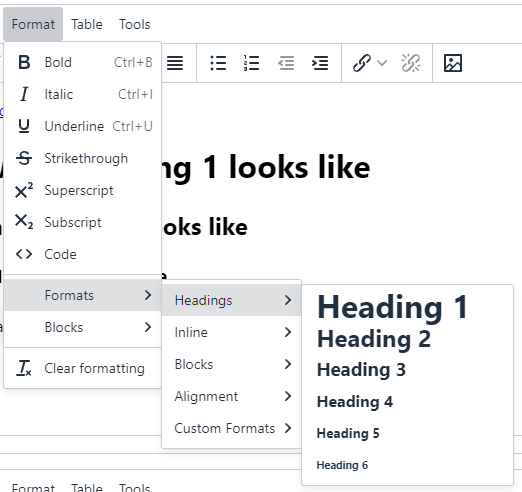
Only Heading 1 to Heading 3 should be used
Heading 1 is the Section name in most page layouts, which appears by default at the top of each main content area. This first level heading is already built in to the design of every page and acts as a page introduction.
You should be using Heading 2 for any on-page headings and Heading 3 for any sub-headings under Heading 2.
If you wish to further sub-divide your content below Heading 3 then use bold text to indicate this.
Don't skip headings
Headings should follow a logical order on the page. Starting with 1 and decreasing from there.
Good example, do this:
Heading 1
Introduction text
Heading 2
Topic text
Heading 2
Topic text
Heading 3
Sub-topic text
Heading 2
Topic text
Do not skip numbers!
Bad example, do not do this:
Heading 1
Introduction text
Heading 3
Topic Text
Heading 2
Topic Text
Don't use Heading styles to emphasise text
That's not their purpose. Using headings only to change the size of text for appearance purposes will detract from the accessibility, meaning and maintainability of the page, and have a detrimental effect on SEO.
Instead
Use bold for emphasising a sentence.
Or for emphasising a word or an entire phrase in a sentence.
Use Formats > Paragraph highlight - maybe with bold.
Use Formats > Button links if the text is a link with short text and a call to action:
The Callout Content Type is useful for featuring larger sections of content. Quotes and testimonials or additional notes or calls to action could be placed within callouts. You can create a callout using the Callout Content Type or by formatting text to be a 'Blockquote' within any content item featuring the additional formatting options in the HTML editor.