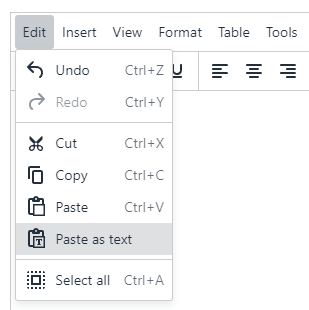
Copying and pasting text content
Be careful when pasting content into an HTML editor field from another source.
Text pasted into an HTML editor field from another source (eg Microsoft Word, or a web page) can contain background code that:
- at best, is unnecessary, increasing the download weight of the page
- at worst, can affect display of content and functionality of the page
To avoid this, always use the T4 menu bar option:
Edit > Paste As Text
when pasting text content from elsewhere, then recreate headings, lists and other typographic elements where necessary.
Alternatively paste text content into a simple text editor like Windows Notepad before copying and pasting again into the T4 HTML editor field. This will also clear out any background code held in the Windows clipboard, like the previous method.
You can also clear the formatting of content within the editor using the menu bar option Format > Clear formatting. To use this, highlight the content in the editor you wish to remove the formatting from and press the menu option.
Images should always be added to content using the Insert From Media menu options, so that the correct Media Library item is referenced - even if it is relocated later in the Media Library.