Video Embed

YouTube video

This text is entered in the Video description field.  You can add formatting, links and media (images, and document links) using the HTML editor toolbar.

Text in the Video summary field is required for accessibility purposes, but doesn't appear on the generated page.

A YouTube video ID is entered to generate this embedded video:

YouTube Video ID

You can find the ID for a YouTube video on the YouTube video's webpage by looking at the page URL.
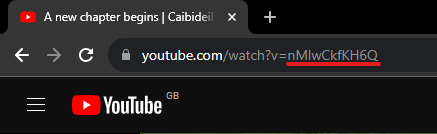
Screenshot of YouTube video page url highlighting the video ID

The string of characters after 'v=' is the video ID. In the example above the URL is www.youtube.com/watch?v=nMlwCkfKH6Q so the ID would be nMlwCkfKH6Q.

If you are struggling to find the ID on a YouTube video then email webteam@uhi.ac.uk and they will be able to assist.

You can also collapse the video section like One-Web General Content

YouTube video

This text is entered in the Video description field. You can add formatting, links and media (images, and document links) using the HTML editor toolbar.

Text in the Video summary field is required for accessibility purposes, but doesn't appear on the generated page.

A YouTube video ID is entered to generate this embedded video:

Hosting Video

Video files are not hosted within the T4 Media Library.

Use an approved UHI YouTube account and upload your video there then link to it using the ID. If you would like to upload a video to the main UHI YouTube Channel then please email webteam@uhi.ac.uk for assistance.